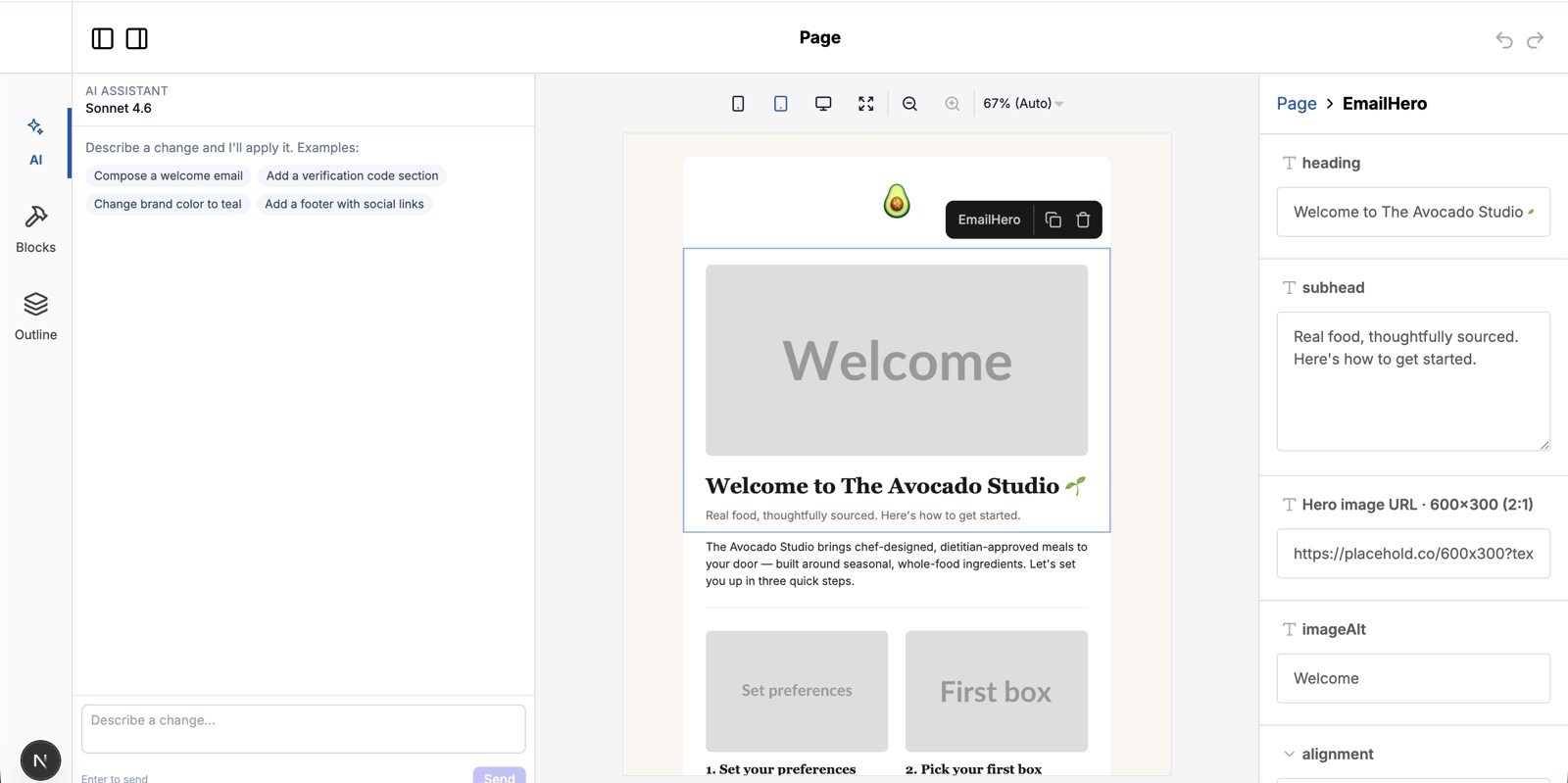
An AI email builder: drag-and-drop canvas, design assistant in the sidebar
A weekend experiment porting my site-editor architecture to marketing emails — drag-and-drop blocks, an AI design assistant, react.email under the hood. Shared Zod schemas let the canvas and the planner stay in lockstep.
- AI
- Experiment
The itch
Most email builders fall into one of two buckets. The visual ones (Mailchimp, Klaviyo, Beefree) give you a canvas but no real way to describe what you want. The AI ones generate a finished HTML blob you can barely edit afterward. Neither feels like the way I actually want to write email — visual structure, conversational refinement, both round-tripping cleanly through the same document.
I’d already built that pattern for Avocado Studio (my AI site editor). I wanted to see how much of it transferred to email — a different rendering target, a different set of constraints, but the same underlying idea: block schemas, structured operations, a planner that proposes changes you can preview.
The result is ai-email-builder — a standalone demo, not part of the monorepo.
The stack
- Next.js 15 app, single page on port 3030
- Puck for the drag-and-drop canvas
- react.email for cross-client HTML rendering
- Claude Sonnet 4.6 as the planner (extended thinking optional)
- Resend for the test-send button
Pick a template (welcome, re-engagement, event invite, product announcement, feedback survey, newsletter), edit visually or chat with the assistant, preview desktop/mobile/dark, send to your inbox.
The one design choice that mattered
Block schemas are written once, in Zod, and consumed in two places:
- The Puck config — Zod fields become Puck’s field definitions, so the visual editor’s right-hand panel is generated from the schema.
- The planner prompt — the same schemas are serialised into a textual contract the LLM gets in its system prompt, so it knows the exact shape of every block, every prop, every enum.
That means the AI can never propose an edit the canvas can’t render, and the canvas can never produce state Puck can serialize but the AI can’t reason about. Both editors speak the same language — a small set of operations:
add_block      — insert a block at an index
update_props   — patch a subset of one block's props
move_block     — reorder
remove_block   — delete
update_meta    — change subject, preheader, or active brand theme
The planner outputs a JSON object with a short reply and an ops[] array. The canvas reduces them. The same reducer is used whether the ops come from chat or from a drag.
How Claude is actually wired in
The planner is a single Anthropic messages.stream call with one tool registered — apply_ops — whose input_schema mirrors the same Zod block schemas the canvas uses. tool_choice is forced to apply_ops, so Claude can’t take a conversational detour; every response has to land as a structured op list.
const stream = client.messages.stream({
  model: "claude-sonnet-4-6",
  system: systemPrompt(doc),       // block contract + current doc + themes
  tools: [{ name: "apply_ops", input_schema: opSchema }],
  tool_choice: { type: "tool", name: "apply_ops" },
  messages: [...history, { role: "user", content: message }],
});
Forcing the tool unlocks the part I care about most: progressive input_json_delta streaming. Each token of the tool’s JSON input fires as a delta, so I run a partial-JSON parser (parsePartialJson from the ai SDK) over the buffer on every chunk and emit two kinds of events to the client — reply_delta for the chat text, op_added for each newly-completed op. The reply field is required to appear first in the JSON object, which means the user sees the assistant’s sentence stream into the sidebar before the first block change lands on the canvas.
A couple of small but load-bearing details:
- Extended thinking is opt-in via
ANTHROPIC_THINKING_BUDGET. With thinking on, Anthropic requirestool_choice: "auto", which means Claude emits free text first and then dumps the whole tool input in one final burst — ops appear all at once instead of streaming. Worth it for harder edits, off by default. - The client’s
AbortSignalis forwarded into the SDK call, so hitting Stop in the UI cancels the upstream Anthropic request instead of just closing my response stream. Without that you keep paying for tokens after the user gave up.
The planner is the only Anthropic-specific code in the project. Everything downstream — the ops, the reducer, the renderer, the themes — is provider-agnostic. Swapping in OpenAI (response_format with a JSON schema, or a function-tool with tool_choice: "required") or Gemini (native function calling) would be a single-file change. Same JSON shape, same op vocabulary, same canvas. The interesting work was in defining the schema once and forcing the model to stay inside it, not in picking the model.
chat msg ──► /api/plan (Claude) ──► op stream ──► applyOps ─┐
                                                            ├─► PuckData
drag/drop ──► Puck dispatch ──────► ops adapter ────────────┘
                                                            │
                                                            ▼
                              email block React tree ──► @react-email/render ──► HTML iframe
                                                            │
                                                            ▼
                                                     /api/send (Resend)
Themes, not styles
The other thing that fell out cleanly: every email is rendered under a brand theme that owns logo, fonts, colors, button shape, footer treatment, image radius, and section padding. Block props carry structure and copy; the theme carries brand. Switching from “Fresh” to “Bistro” or “Studio” doesn’t touch a single block — it re-renders the same tree against different tokens.
That separation was non-negotiable for me. The whole point of an AI assistant in this surface is that the user can say “make it more playful” or “use our muted brand” without the model having to rewrite twelve color props one by one. The planner switches the theme; the renderer does the rest.
What surprised me
react.email is the right rendering layer. I went in expecting to fight HTML email’s table-soup legacy. Instead I wrote React components, @react-email/render produced inlined HTML that survives Gmail / Outlook / Apple Mail without ceremony, and the same components render in the Puck canvas during editing. One source of truth for the block, two consumers.
The planner does less than I expected — and that’s the win. Almost every interesting behaviour (theme switching, variable substitution, template seeding) is deterministic. The model decides which operation to emit; it doesn’t decide how the canvas renders. Keeping the LLM on a narrow surface is how you stop it from drifting.
Puck handles plugin-style chat naturally. I dropped the AI chat in as a sidebar plugin alongside Puck’s own outline and fields panels. Same undo stack, same dispatch. The architectural assumption from the site editor — that operations are the shared language between any number of editing surfaces — held up perfectly here too.
What’s still rough
It’s a demo. Variable substitution ({{firstName}}) works but isn’t validated against a recipient schema yet. There’s no version history beyond Puck’s own undo. Send analytics, list management, and approval workflows are all out of scope on purpose — this is the authoring surface, not a sending platform.
But as an experiment in how far the operations pipeline travels across domains, it travelled further than I expected. Site editor → email builder, a few hours with Claude Code, the core idea unchanged.